
HTML
How to download HTMl Editors
How to use HTML tags
How to Comment in HTML
How to create an HTML link
How to link to a specific part of a page HTML
How to Insert Images with HTML
How to insert audio in HTML
How to insert videos in HTML
How to use Table Tag in HTML
How to Use HTML List Elements
How to use HTML Iframe
How to use HTML Symbols
How to use HTML Color Codes
How to Create HTML Form
How to learn HTML
CSS
How to use CSS Background
JS
PHP
How to redirect to another page using PHP
How to get last inserted id in MySQL using PHP
How to learn php
How to insert a row into database by using PHP
How to fetch data from table by using php
How to print table data by using while loop in php
How to perform search operation into database by using php
MySQL
How to create Table in PHP MySQL?
How to Insert Data Into MySQL Database Table Using PHP?
How to Select Data from MySQL Database Tables Using PHP
How to Update data in MySQL Database Table using PHP
How to Delete Data from MySQL using PHP
How to make MySQL query ORDER BY conditions
How to Select LIMIT data in PHP MySQL
SQL
BOOTSTRAP
AJAX
DATATABLE
SEO
EARNING
YOUTUBE
WordPress
How to Install WordPress?
How to use WordPress Dashboard?
How to Install Plugins in WordPress?
How to Customize WordPress Plugins?
How to Change General Settings in WordPress?
How to Change Writing Settings in WordPress
How to Setup the Reading Settings in WordPress
How to Setup the Discussion Settings in WordPress
How to Setup the Media Settings in WordPress
How to Setup the Permalink Settings in WordPress
How to Setup the Plugin Settings in WordPress
How to Add Categories to WordPress
How to Edit Category in WordPress
How to Delete Category in WordPress
How to Arrange Category in WordPress
How to Add a new Post in WordPress
How to Edit Post in WordPress
How to Delete Post in WordPress
How to Review Post in WordPress
How to add Media in WordPress
How to Edit Media in WordPress
How to add a Page in WordPress
How to Delete Media in WordPress
How to Add Page in WordPress
How to Edit Pages in WordPress
How to Learn WordPress
How to Delete Page in WordPress
How to add New Tag in WordPress
How to Edit Tags in WordPress
How to Delete Tags in WordPress
How to Add Comments in WordPress
How to Edit Comments in WordPress
How to Moderate Comments in WordPress
How to Add User in WordPress
How to Edit User in WordPress
How to Delete User in WordPress
How to Manage WordPress Themes
How to Customize Theme in WordPress
How to Manage Widget in WordPress
How to Change Background in WordPress
How to Transfer Host in WordPress
How to Update Version in WordPress
Answer: The Updates page is divided into three sections. If your version of WordPress requires updating, this will be displayed at the top of the page. Below that, you’ll be notified of any plugin updates and below that again, theme updates.
Updating your WordPress version is as simple as clicking the Update Now button. WordPress will download the necessary files, perform a validation of those files and then automatically update your site.
Before updating your site, it’s always wise to perform a backup first, just in case something unfortunate happens during or after the installation.
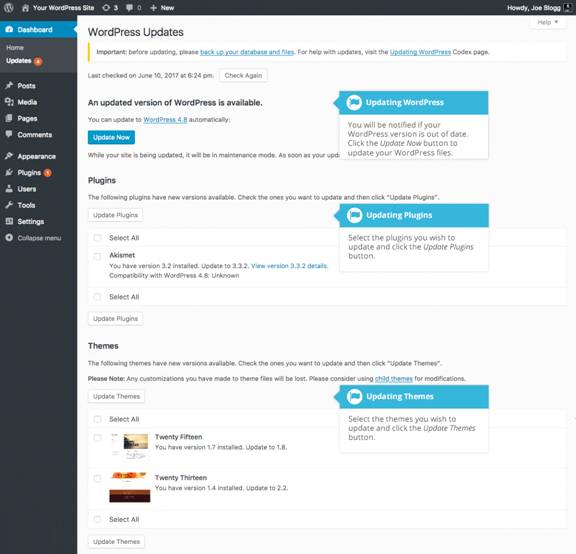
If there are any plugins that can be updated, these will be listed in the Plugins section on the page. To update your plugins, tick the boxes next to each of the plugins you wish to update and then click the Update Plugins button. The new plugin files will be downloaded and automatically installed.
If there are any themes that can be updated, these will be listed in the Themes section on the page. To update your themes, tick the boxes next to each of the themes you wish to update and then click the Update Themes button. The new theme files will be downloaded and automatically installed.
After your site has been updated, no matter whether it’s been done automatically, manually or just themes and plugins, it’s a good idea to give your site a quick test to make sure it’s functioning as expected. This will ensure that the new themes, plugins or even WordPress itself haven’t introduced new functionality that adversely affects your site or changes how your site operates.
